Getting Started
Getting Started
For clients with an extensive parts/article catalog that may be subject to classification and export control, it is beneficial to establish an electronic data exchange between the client's inventory management system and CU-TA CTC. This serves the efficiency and quality assurance of the company. Efficiency is achieved by eliminating the time-consuming manual entry of article master data into the CU-TA system, as well as the elimination of entering customs-relevant master data in the client's inventory management system. Quality is improved because automated data transfer avoids the typical errors associated with manual maintenance of master data. The organization of the machine-to-machine data exchange in the upload and download process consists of the following essential elements:
- Determination of the communication method
- Specification of the interface content (interface description)
- Workflow for upload and download processes
- Handling of error messages
Data Exchange Options
There are various technical solutions available for populating CU-TA with the client's article/part master data. Different options are available.
SFTP - Secure File Transfer Protocol
In SFTP communication, a client-specific port is named and set up by CU-TA. This address is used for submitting and retrieving the article master data.
The SFTP Manual is available at SFTP Manual.
Web service
With a web service, the data to be exchanged is defined within a specified communication framework, and continuous updates on the processing status are provided.
Please refer to the API Documentation for detailed information API Documentation.
Web Service - Base URL
https://app.cu-ta.de/api/:prefix/v1
Web Service - Authentication
All API requests require authentication using an API key. Include your API key in the request header:
Authorization: Bearer YOUR_API_KEY
Manual upload
When creating article lists, files can be manually uploaded/downloaded via a web browser.
Interface Description
When uploading, the part or item number is required as a unique assignment criterion; other elements are designation and, in the area of characteristics, particularly helpful specifications that can considerably facilitate the process of classification.
| Field on Mask (English) | Field Name in CSV File | Import (CU-TA Incoming) | Mandatory for Import | Export (CU-TA Outgoing) |
|---|---|---|---|---|
| Article Number | article_number | Yes | Yes | Yes |
| Article Description | description1 | Yes | Yes | Yes |
| Article Description B | description2 | Yes | Yes | |
| Feature 1 | feature1 | Yes | Yes | |
| Feature 2 | feature2 | Yes | Yes | |
| Feature 3 | feature3 | Yes | Yes | |
| Feature 4 | feature4 | Yes | Yes | |
| Feature 5 | feature5 | Yes | Yes | |
| Feature 6 | feature6 | Yes | Yes | |
| Manufacturer | manufacturer | Yes | Yes | |
| Priority Administration | is_prio | Yes | Yes | |
| Archive | archive | Yes | No | |
| Type of Classification | type | No | Yes | |
| Customs Tariff Number | ctn_eu | No | Yes | |
| VZTA Number | bti_eu | No | Yes | |
| Valid From | valid_from | No | Yes | |
| Valid Until | valid_until | No | Yes | |
| Fixed | is_fixed | No | Yes | |
| Trade Designation | commercial_designation1 | No | Yes | |
| Trade Designation B | commercial_designation2 | No | Yes | |
| Classification Comment | tariff_classification_comment | No | Yes | |
| AL Numbers | list_of_goods | No | Yes | |
| Dual-Use Comment | list_of_goods_comment | No | Yes |
API Access
To manage API access effectively, follow these steps for generating API users and tokens, and handling multiple instances like Test and Live environments.
Managing Multiple Connections
Recommended Method: Seperate API Users
To maintain both Test and Live connections simultaneously, create separate API accounts:
- Use emails like
apiemail+live@domain.comandapiemail+test@domain.com. - Generate tokens for each account and use them for the specific connections needed.
Alternative Method: Switching Connections
User is tied to one connection at a time - so you need to "lock" the connection to the desired instance for example the Test instance.
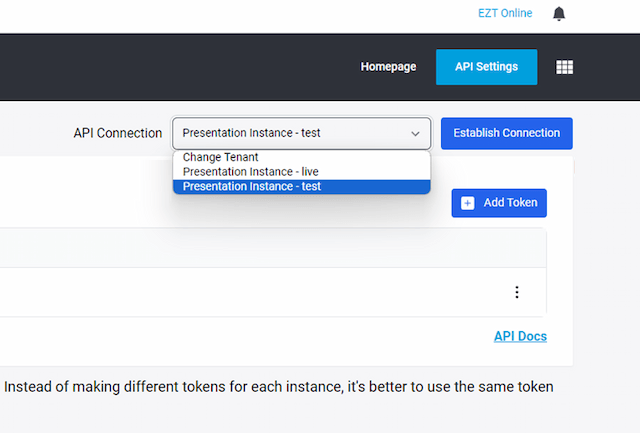
If you have decided to use a single API user:
- Lock the connection to the Test instance while testing.
- Once done, switch the connection back to Live.
Test connection from working.Creating API Users & Tokens
First,
- Create an API User and Assign the API Role to it.
Login
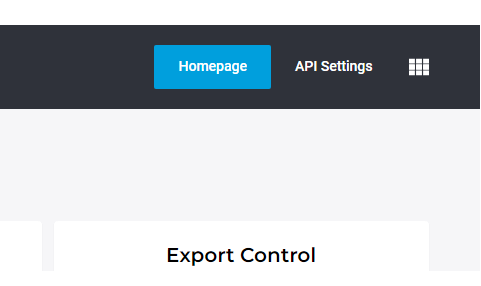
- Once you're logged in navigate to the "API Settings" menu at the top right corner of the screen.
Next
- Add a token identifier and create your token.
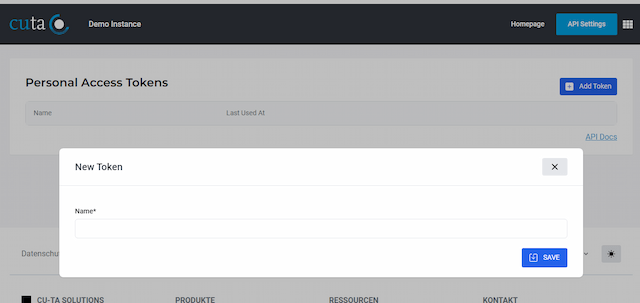
THE "+" indicator
Use a plus sign "+" to distinguish between email addresses for different instances. Notifications for API errors or updates will be sent to both client administrators and users, with the part of the email after the "+" being ignored. Password reset notifications will be sent to these email addresses as well as can be managed by client administrators through the web interface.
Initiate Data Exchange connection
Please choose one of the following resources for further guidance:
Setting Up
Understanding Prefixes
Each account is created with 3 instances (live, training & test), each has a unique prefix.
Live: For real-time operations.Training: For training purposes.Test: For IT department tests, such as data exchange tests.
API Access
1. Creating API Users
- TEST e.g.
apiuser+test@domain.com - LIVE e.g.
apiuser+live@domain.com
2. Generate Tokens for Each
- Login, Go to the "API Settings" menu at the top right corner and create api tokens for each
User Access
The "+" Indicator
- The
"+"sign in email addresses helps distinguish between different instances. - Notifications and password resets sent to these addresses will be managed appropriately, ignoring the part after the
"+".
User Creation
Here are a few important points to know about user creation before we continue:
- Users created in LIVE automatically have access to both
trainingandlive. - Deleting a user from LIVE removes them from both
training&live. - Users created in
testonly have access thetestinstance. - Users created in
trainingonly have access thetraininginstance.
If you're ready, click and jump to